The IntelligenceBank Connector for Adobe Creative Cloud is built as a CEP extension. CEP extensions do not work on native Apple Silicon computers.
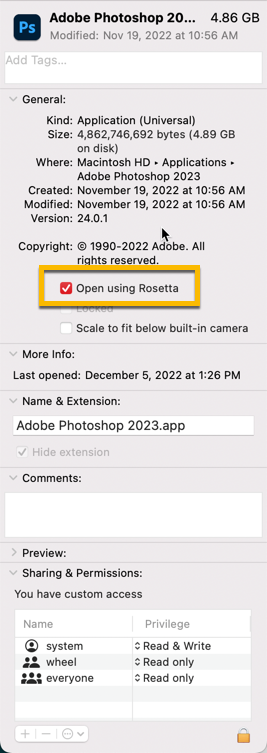
To use extensions in Photoshop on a native Apple Silicon computer, you need to run Photoshop in Rosetta mode. To enable this:
- Right-click the Photoshop application icon in your Applications folder.
- Select Get Info.
- Enable the Open using Rosetta option.
The Extensions (Legacy) menu will then appear in Photoshop.
Note: Running Photoshop under Rosetta mode comes with functionality limitations. See Adobe's Photoshop for Apple Silicon page for details.
Was this article helpful?
That’s Great!
Thank you for your feedback
Sorry! We couldn't be helpful
Thank you for your feedback
Feedback sent
We appreciate your effort and will try to fix the article